Friday, 22 February 2019
Thursday, 14 February 2019
What's New in VMC on AWS - In February 2019
- Storage Auto Scale Up
- Custom CPU Core Count = Now Customer can specify number of cpu cores at per esxi hosts level. Earlier it was fixed number of cpu cores.
- Native Support for MS SQL Server Clustering
- SRM Enhancements
- SRM Connectivity Checker in Troubleshooting Tab
- Support for Fan-In and other multi-site topologies
- Networking Enhancements
- Default Logical Network with Default CIDR will not be created if SDDC is created with 2/3 Nodes.
- BGP Routes from On-Prem will be available in VPN UI/API
- Overview Network topology shows Source NAT Public IP
- Rename SDDC
- Delete Restricted Role = New Role is Introduced.
Saturday, 9 February 2019
How to Find Out Replacement of Deprecated vROPS Metrics?
With vROPS 6.7 version VMware Released the Upgrade Assessment Tool which is available as .Pak File. With this tool one can check what will be impacted after upgrade from older version of vROPS (Prior to 6.7) to vROPS 6.7 or later.
Here is the Video on How to Use Upgrade Assessment Tool
Links for Downloading Upgrade Assessment Tool
vROPS 7.x = https://my.vmware.com/group/vmware/get-download?downloadGroup=VROPS-700
vROPS 6.7 = https://my.vmware.com/group/vmware/details?productId=735&downloadGroup=VROPS-670
How to Find the Replacement of Deprecated vROPS Metrics
If you have upgraded your vROPS Envrionment to vROPS 6.7 or later with Upgrade Assessment Tool one can find out the deprecated Metrics and then by using these deprecated metrics names you can find out the replacement of these metrics in new upgraded version of vROPS. Use the link given below to find out the replacement of deprecated metrics:-
http://partnerweb.vmware.com/programs/vrops/DeprecatedContent.html
You will see the results like this:-
Here is the Video on How to Use Upgrade Assessment Tool
Links for Downloading Upgrade Assessment Tool
vROPS 7.x = https://my.vmware.com/group/vmware/get-download?downloadGroup=VROPS-700
vROPS 6.7 = https://my.vmware.com/group/vmware/details?productId=735&downloadGroup=VROPS-670
How to Find the Replacement of Deprecated vROPS Metrics
If you have upgraded your vROPS Envrionment to vROPS 6.7 or later with Upgrade Assessment Tool one can find out the deprecated Metrics and then by using these deprecated metrics names you can find out the replacement of these metrics in new upgraded version of vROPS. Use the link given below to find out the replacement of deprecated metrics:-
http://partnerweb.vmware.com/programs/vrops/DeprecatedContent.html
You will see the results like this:-
What is VMware ELS (Enterprise Learning Subscription)?
Sending your IT team offsite for training is not always an option. The VMware
Enterprise Learning Subscription delivers convenient and flexible training that
lets your team train at their own pace — when and where they want.
This all-inclusive offering gives each licensed user access to all content available
through the Learning Zone, including all VMware On Demand courses.
Subscribers also get a free VMware certification exam voucher.
To Know more about ELS and To Purchase it Click Here
Tuesday, 5 February 2019
Another Feather in the Cap - Awarded as Top 25 Virtualization Blogs Winner
Thanks Everyone for reading my blog content and electing my blog as Top 25 Virtualization Blogs Winner.
Results Link
Results Link
VMware Two Year Mandatory Re-Certification Requirement is Removed Now - Yippppeeee!!!!!
VMware removed the requirement to re-certify their VCP certifications within a 2 year period with Immediate effect. Although upgrade paths are still available but now it is your choice whether you want to upgrade or not rather than a mandatory requirement?
FAQ's
VMware Blog Article
FAQ's
VMware Blog Article
Enhanced Search Functionality vROPS 7.0 - New Feature
Everyone who is using vROPS is very well aware of search feature in upper right hand corner. Which is used to search for common object names like VM's, Host, Cluster etc.
What's New - New search options to search and launch content such as dashboards, views, supermetrics, alerts, and so on.
Predefined Terms
The search function supports several common categories you can employ to find the item you seek quickly, as follows:
1. Login to vROPS Product UI
2. Click on Search in Upper Right Hand Corner
3. Type Category
4. After Category Selection Use Keyword according to your search requirement
What's New - New search options to search and launch content such as dashboards, views, supermetrics, alerts, and so on.
Predefined Terms
The search function supports several common categories you can employ to find the item you seek quickly, as follows:
- Dashboard
- Object
- Supermetric
- Alert definition
- Symptom definition
- View
- Report
1. Login to vROPS Product UI
2. Click on Search in Upper Right Hand Corner
3. Type Category
4. After Category Selection Use Keyword according to your search requirement
Monday, 4 February 2019
vROPS 6.7 or Later - Enable Dark Theme
In vROPS 6.7 VMware Re-Introduced Dark Theme. To use this one must have vROPS 6.7 or Later Version.
How to enable Dark Theme
1. Login to vROPS Product UI
2. Click on User Icon in Right Hand Side Top Corner > Click on Preferences
3. Select the Dark Theme from Dropdown > Save
4. Once enabled this is how your Product UI will be changed
How to enable Dark Theme
1. Login to vROPS Product UI
2. Click on User Icon in Right Hand Side Top Corner > Click on Preferences
3. Select the Dark Theme from Dropdown > Save
4. Once enabled this is how your Product UI will be changed
vROPS 7.0 Admin Account Password Reset - New Feature
In vROPS 7.0 new functionality has been introduced where you can change the admin account password from Admin UI without login to vROPS VM Console. Here is how you can do this:-
1. Login to Admin UI
2. Click on Right Hand Side Top Corner User Icon > Then Click on Change Administrator Password
3. Type the Current and New Password and then click on Save.
1. Login to Admin UI
2. Click on Right Hand Side Top Corner User Icon > Then Click on Change Administrator Password
3. Type the Current and New Password and then click on Save.
Wednesday, 23 January 2019
Professional vSphere 6.7 Delta Exam 2019 - Exam Release Notification
New Exam Professional vSphere 6.7 Delta Exam 2019 is available for booking since 18 January 2019. Here is the details about this exam:-
Exam Name = Professional vSphere 6.7 Delta Exam 2019
Exam Code = 2V0-21.19D
Exam Language = English
Exam Cost = Check the Country Specific Pricing from Pearson Website.
Number of Questions = 40
Time Limit = 75 Minutes
Delivery Type = Proctored
Exam Format = Single and Multiple Choice Questions
Passing Score = 60% (300/500)
Solution Track = Data center Virtualization
Product Version Alignment = vSphere 6.7
Download Link for Exam Guide
Note - This exam is only for the candidates those who wants to update their VCP6.5-DCV Certification.
Exam Name = Professional vSphere 6.7 Delta Exam 2019
Exam Code = 2V0-21.19D
Exam Language = English
Exam Cost = Check the Country Specific Pricing from Pearson Website.
Number of Questions = 40
Time Limit = 75 Minutes
Delivery Type = Proctored
Exam Format = Single and Multiple Choice Questions
Passing Score = 60% (300/500)
Solution Track = Data center Virtualization
Product Version Alignment = vSphere 6.7
Download Link for Exam Guide
Note - This exam is only for the candidates those who wants to update their VCP6.5-DCV Certification.
Professional vSphere 6.7 Exam 2019 - New Exam Released
New Exam Professional vSphere 6.7 Exam 2019 is available for
booking since 18 January 2019. Here is the details about this exam:-
Exam Name = Professional vSphere 6.7 Exam 2019
Exam Code = 2V0-21.19
Exam Language = English
Exam Cost = Check the Country Specific Pricing from Pearson Website.
Number of Questions =70
Time Limit = 115 Minutes
Delivery Type = Proctored
Exam Format = Single and Multiple Choice Questions
Passing Score = 60% (300/500)
Solution Track = Data center Virtualization
Product Version Alignment = vSphere 6.7
Download Link for Exam Guide
Exam Name = Professional vSphere 6.7 Exam 2019
Exam Code = 2V0-21.19
Exam Language = English
Exam Cost = Check the Country Specific Pricing from Pearson Website.
Number of Questions =70
Time Limit = 115 Minutes
Delivery Type = Proctored
Exam Format = Single and Multiple Choice Questions
Passing Score = 60% (300/500)
Solution Track = Data center Virtualization
Product Version Alignment = vSphere 6.7
Download Link for Exam Guide
Friday, 4 January 2019
Are You Ready For New VCP 2019 Certifications?????
VMware is launching alot of new VMware VCP Certifications this year from different tracks. As last year they have announced the Roadmap for New Certifications as well as New Naming Convention for Certifications.
Here is the link to get for more details about what's coming up:-
https://blogs.vmware.com/education/2019/01/03/its-januarytime-for-the-new-2019-vcp-certifications/
Here is the link to get for more details about what's coming up:-
https://blogs.vmware.com/education/2019/01/03/its-januarytime-for-the-new-2019-vcp-certifications/
Tuesday, 1 January 2019
vSAN 6.7 Storage Policies in vSphere Client (HTML5 Based) - Rules Renamed
In New vSphere Client vSAN Storage Policy Rules are renamed. Lets discuss about what are the new names applicable in vSphere Client
These policy components to determine fault tolerance:-
Site disaster tolerance: Governs fault tolerance between sites.
Failures to tolerate: Governs fault tolerance within each site.
Site Disaster Tolerance
1. None-Standard Cluster = This keeps the data only in one site.
2. None-Standard Cluster with nested fault domains = This Policy keeps the data across fault domains.
3. Dual Site Mirroring (Stretched Cluster) = vSAN maintains replicas of each component on both sites. If the preferred site goes down, the replica on the other site is available to continue operations.
4. None-Keep the data on Preferred (Stretched Cluster) = All components of an object are kept within the preferred site. Use this policy with DRS rules to restrict the VM compute resource to the preferred site hosts.
5. None-Keep the data on Non-Preferred (Stretched Cluster) = All components of an object are kept within the non-preferred site.Use this policy with DRS rules to restrict the VM compute resource to the non-preferred site hosts.
6. None-Stretched Cluster = This policy localizes object components to one site or the other, based on the balance of data between sites.
Failures to Tolerate
1. No Data Redundancy = This is equivalent to PFTT=0
2. 1 Failure -RAID-1 (Mirroring)
3. 2 Failures -RAID-1 (Mirroring)
4. 3 Failures -RAID-1 (Mirroring)
5. 1 Failure -RAID-5 (Erasure Coding)
6. 2 Failures -RAID-6 (Erasure Coding)
For Rest of the rules configuration in your storage policies Use "Advanced Policy Rules" Tab
These policy components to determine fault tolerance:-
Site disaster tolerance: Governs fault tolerance between sites.
Failures to tolerate: Governs fault tolerance within each site.
Site Disaster Tolerance
1. None-Standard Cluster = This keeps the data only in one site.
2. None-Standard Cluster with nested fault domains = This Policy keeps the data across fault domains.
3. Dual Site Mirroring (Stretched Cluster) = vSAN maintains replicas of each component on both sites. If the preferred site goes down, the replica on the other site is available to continue operations.
4. None-Keep the data on Preferred (Stretched Cluster) = All components of an object are kept within the preferred site. Use this policy with DRS rules to restrict the VM compute resource to the preferred site hosts.
5. None-Keep the data on Non-Preferred (Stretched Cluster) = All components of an object are kept within the non-preferred site.Use this policy with DRS rules to restrict the VM compute resource to the non-preferred site hosts.
6. None-Stretched Cluster = This policy localizes object components to one site or the other, based on the balance of data between sites.
Failures to Tolerate
1. No Data Redundancy = This is equivalent to PFTT=0
2. 1 Failure -RAID-1 (Mirroring)
3. 2 Failures -RAID-1 (Mirroring)
4. 3 Failures -RAID-1 (Mirroring)
5. 1 Failure -RAID-5 (Erasure Coding)
6. 2 Failures -RAID-6 (Erasure Coding)
For Rest of the rules configuration in your storage policies Use "Advanced Policy Rules" Tab
Wednesday, 12 December 2018
How to Reset VMC on AWS Cloudadmin User Account Password?
The vCenter Single Sign-On administrator is cloudadmin@vmc.local. The VMC Console displays this password when you open the vCenter instance - it's the password that you copy into the vCenter Single Sign-On screen. You can change this password from the vSphere Client. If you do, the password that the VMC Console displays is no longer correct.
If you reset the password for the cloudadmin@vmc.local user and you forget the password, contact VMware Technical Support. You cannot reset this password.
The password for cloudadmin@vmc.local never expires, but it follows the password policy.
How to Change Cloudadmin User Password:-
1. Open vmc on aws SDDC vCenter > Click on Administration from Menu > Click on Users and Groups Under SSO
2. Click on Edit
3. Type New Password > Click Ok
If you reset the password for the cloudadmin@vmc.local user and you forget the password, contact VMware Technical Support. You cannot reset this password.
The password for cloudadmin@vmc.local never expires, but it follows the password policy.
How to Change Cloudadmin User Password:-
1. Open vmc on aws SDDC vCenter > Click on Administration from Menu > Click on Users and Groups Under SSO
2. Click on Edit
3. Type New Password > Click Ok
Tuesday, 11 December 2018
VMC on AWS Roadmap
VMC on AWS has very fast release phase as new features are constantly developed, tested and added.
If you want to know the product Roadmap, here is link to get Roadmap Information
Roadmap Link
Roadmap Categories:-
Roadmap is categorized in to Four Categories and these categories are:-
1. Available
2. Preview
3. Developing
4. Planned
If you want to know the product Roadmap, here is link to get Roadmap Information
Roadmap Link
Roadmap Categories:-
Roadmap is categorized in to Four Categories and these categories are:-
1. Available
2. Preview
3. Developing
4. Planned
![]() |
| Image Source:VMware |
![]() |
| Image Source:VMware |
Monday, 10 December 2018
VMC on AWS Pricing
If you want to know VMC on AWS Pricing there is Pricing Page Available. Which can be referred to know Pricing on this offering
Disclaimer = Pricing is subject to Change. Please refer VMware Website For Latest Pricing Information
VMware Cloud on AWS service provides simple yet flexible options to consume VMware’s powerful software capabilities and AWS’s elastic, bare-metal infrastructure as a combined offering that can be purchased on-demand, or as 1-year or 3-year subscription. Host configuration: Each SDDC host has 2 CPUs, 36 cores, 512GB RAM, NVMe attached flash storage (3.6 TB cache plus 10.7 TB raw capacity tier). Minimum required configuration for production environment is 3 hosts per cluster. Above the minimum, hosts can be added or removed in 1 unit increments.
Cost Estimator
If you want to Estimate the Cost, Here you can use Cost Estimator
Cost Estimator Tools
https://cloud.vmware.com/vmc-aws-tco-pricing/
https://vmcsizer.vmware.com/home
Disclaimer = Pricing is subject to Change. Please refer VMware Website For Latest Pricing Information
VMware Cloud on AWS service provides simple yet flexible options to consume VMware’s powerful software capabilities and AWS’s elastic, bare-metal infrastructure as a combined offering that can be purchased on-demand, or as 1-year or 3-year subscription. Host configuration: Each SDDC host has 2 CPUs, 36 cores, 512GB RAM, NVMe attached flash storage (3.6 TB cache plus 10.7 TB raw capacity tier). Minimum required configuration for production environment is 3 hosts per cluster. Above the minimum, hosts can be added or removed in 1 unit increments.
![]() | |||
| Source:VMware |
![]() | ||||||
| Source:VMware |
Cost Estimator
If you want to Estimate the Cost, Here you can use Cost Estimator
![]() | |||
| Source: VMware |
https://cloud.vmware.com/vmc-aws-tco-pricing/
https://vmcsizer.vmware.com/home
VMC on AWS FAQs
As VMC on AWS is hot topic in the market. If you have some question on VMC on AWS. I hope this FAQs might be informative:-
FAQs link
FAQs link
Max. Number of Clusters Supported in VMC on AWS SDDC
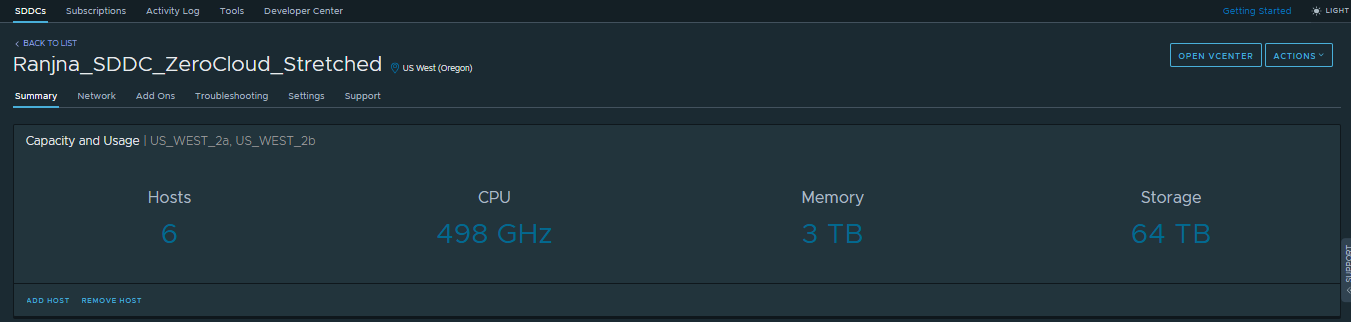
In VMC on AWS, one can create either Stretched Cluster or Non-Stretched Cluster SDDC
Stretched Cluster SDDC
You can keep Max. 1 Stretched Cluster Cluster in Stretched Cluster SDDC. Check the Screenshot shared below, as there is no option to add new cluster:-
Non-Stretched Cluster SDDC
You can keep Max. 10 Non-Stretched Clusters in Non-Stretched Cluster SDDC. Check the Screenshot shared below:-
Stretched Cluster SDDC
You can keep Max. 1 Stretched Cluster Cluster in Stretched Cluster SDDC. Check the Screenshot shared below, as there is no option to add new cluster:-
Non-Stretched Cluster SDDC
You can keep Max. 10 Non-Stretched Clusters in Non-Stretched Cluster SDDC. Check the Screenshot shared below:-
Sunday, 9 December 2018
Features Supported by NSX-V and NSX-T in VMC on AWS
SDDC's in VMC on AWS either uses NSX-T or NSX-V. In my previous post i have shared how can you find out whether your SDDC is backed by NSX-V or NSX-T now If you want to know what are the features supported by NSX-V or NSX-T in VMC on AWS, check this table:-
Refer this link for detailed Info
![]() |
| Image Credit-VMware |
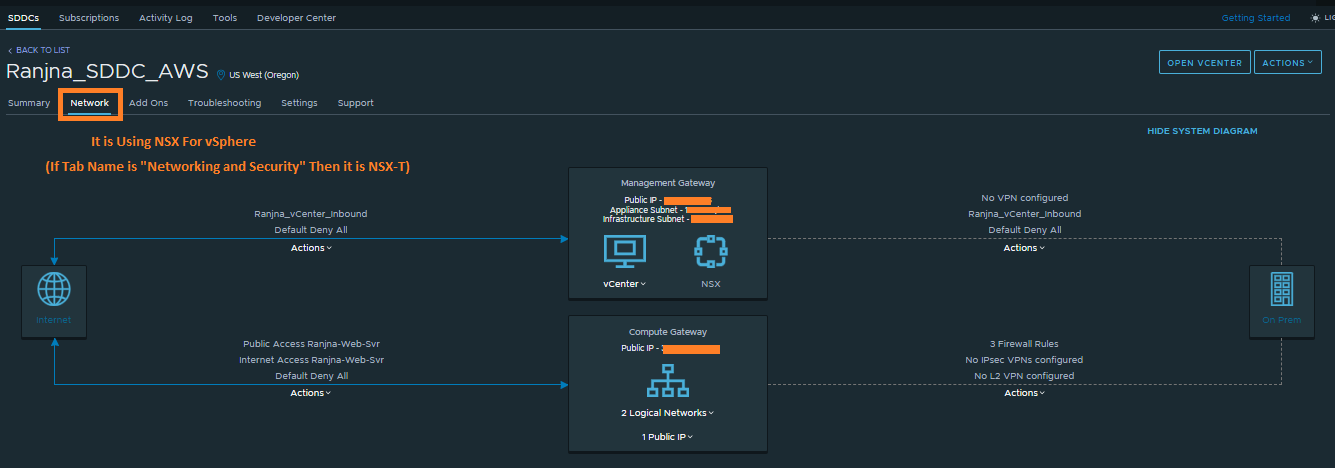
How to Identify VMC on AWS SDDC is Using NSX for vSphere or NSX-T?
1. Connect with https://vmc.vmware.com/
2. Login with your email ID
3. Click on View Details of your SDDC
4. Check the name of Tab available for Network Settings
2. Login with your email ID
3. Click on View Details of your SDDC
4. Check the name of Tab available for Network Settings
Saturday, 1 December 2018
vRA 7.5 - No More Goal Navigator
Those who worked with previous vRA version they must have seen "Goal Navigator" to access the options and it guides you through high level goals that you might want to accomplish in VRA. Even these options can be directly accessed through tabs what you can access from Goal Navigator. But It's Removed in vRA 7.5
I believe reason of removing this option is New Simplified UI
Subscribe to:
Posts (Atom)