Translate

Total Pageviews

My YouTube Channel

Wednesday, 27 February 2019

NSX-T IP Pools - Part 6

IP pools are for the tunnel endpoints (TEPs). Tunnel endpoints are the source and destination IP addresses used in the external IP header to uniquely identify the hypervisor hosts (ESXi or KVM) originating and terminating the NSX-T Data Center encapsulation of overlay frames. You can also use either DHCP or manually configured IP pools for tunnel endpoint IP addresses.

If you missed previous parts in this blogpost series. Here is the Links:-
Part - 1
Part - 2
Part - 3
Part - 4
Part - 5

How to Create IP Pool
1. Login to NSX Manager UI
Start Web Browser > https://NSXManagerFQDNorIP > Username = admin, Password = As Configured

2. Inventory > Groups > IP Pools > Add


3. Configure Name, Description and Add Subnets > Add

Note:- 
  • If you have clients more than /24 and need more IPs or overflowing IPs from one subnet.
  • If you have multiple Racks, multiple ToRs then create multiple TEP pools.


Monday, 25 February 2019

NSX-T Transport Zone - Part 5

Transport Zone is logical boundry to control the visibility of logical switches to hosts, who can see which logical switch can be controlled with Transport Zone. Which helps to control the communication. If you missed the previous parts in this blog series, Here is the links:-

Part - 1
Part - 2
Part - 3
Part - 4

How to Create Transport Zone
1. Login to NSX Manager UI
Start Web Browser > https://NSXManagerFQDNorIP > Username = admin, Password = As Configured


2. Fabric > Transport Zones > Add


3. If you want to create Overlay Transport Zone Select Overlay Option and N-VDS Name is Needed here for the Transport Zone Creation, this N-VDS will be created as Host Switch (ESXi) or Open vSwitch (KVM) depends on the type of hypervisor you are using as soon as those are attached with Transport Zone.
Optionally Uplink Teaming Policy can be specificed.

N-VDS Mode Types:-
Standard
Enhanced Datapath


4. If you want to create VLAN Transport Zone.


NSX-T Central Control Plane Cluster Deployment - Part 4

Now in this blogpost series we are now going to discuss about the NSX-T Controller Deployment. If you missed the previous posts in this series. Here is the Links:-

Part - 1
Part - 2
Part - 3

NSX-T Controller Deployment Requirements
As in my previous post i have discussed that NSX-T Controller is available in VM Form Factor.

Information Source : VMware Docs

https://docs.vmware.com/en/VMware-NSX-T/2.2/com.vmware.nsxt.install.doc/GUID-447C0417-A37B-4C2E-965E-499F52587160.html

NSX-T Controller Automated Deployment - UI Based
In this post i will discuss about automated deployment of NSX-T Controller in vSphere Environment, which requires vCenter. Although NSX-T has no must requirement to use vCenter Server, if you do not have vCenter or vSphere Environment then you have to perform Manual Deployment.

A.  Add Compute Manager
1.. Login to NSX Manager UI
Open Web Browser > Type https://NSXManagerFqdnORip > Username = admin, Password = As Specified > Click Login

2. Fabric > Compute Managers > Add


3. Enter vCenter Details > Click on Add


4. If you have not entered the thumbprint in previous step, it will pop-up this message > Click on Add


5. Verify the Status Finally.

B. Add NSX Controllers
 System > Components > Add Controllers


Provide the required details


provide the details for first controller Node

Click on Add Controller and provide the details for second controller Node


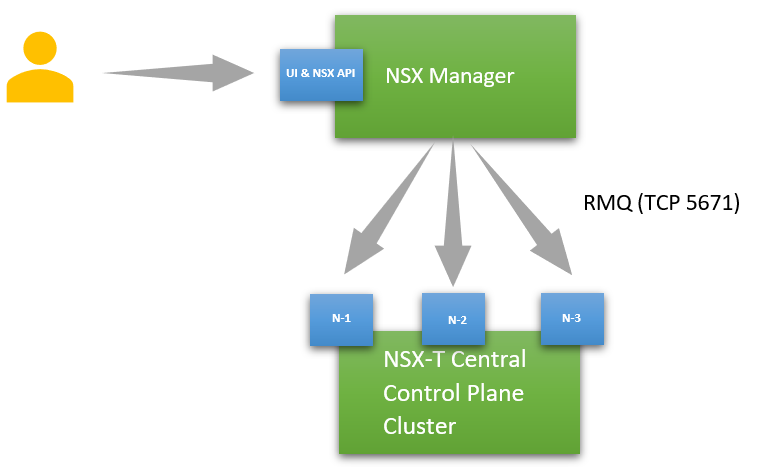
Click on Add Controller again and provide the details for third controller Node. NSX Central Control Plane Cluster can have maximum three Nodes:-


Once all the Nodes gets deployed then NSX Manager UI will also be updated. Now Login to One of the controller node and check the status of cluster and even you can verify the status of the currently connected Node, Is it Master or not

get control-cluster status


NSX-T Controller Deployment on ESXi - Manual Method
https://docs.vmware.com/en/VMware-NSX-T/2.2/com.vmware.nsxt.install.doc/GUID-24428FD4-EC8F-4063-9CF9-D8136740963A.html

NSX-T Controller Deployment on KVM - Manual Method
https://docs.vmware.com/en/VMware-NSX-T/2.2/com.vmware.nsxt.install.doc/GUID-63BC6E07-F926-4BAC-9A22-E2C0B1E87435.html


Sunday, 24 February 2019

NSX-T Manager Deployment - Part 3

In my previous posts i have discussed about what is NSX-T and It's Planes. If you haven't seen these posts, here is the link:-

Part -1 
Part -2 

As discussed in previous post NSX Manager is available in the VM form Factor. Let's talk about the deployment of NSX Manager. NSX Manager is deployed as an virtual appliance.

Requirements:-
Information Taken From VMware Docs
 https://docs.vmware.com/en/VMware-NSX-T-Data-Center/2.3/com.vmware.nsxt.install.doc/GUID-A65FE3DD-C4F1-47EC-B952-DEDF1A3DD0CF.html

How to Deploy NSX Manager Appliance
https://docs.vmware.com/en/VMware-NSX-T-Data-Center/2.3/com.vmware.nsxt.install.doc/GUID-FA0ABBBD-34D8-4DA9-882D-085E7E0D269E.html

NSX-T Planes Introduction - Part 2

NSX-T Management Plane 
NSX Manager
NSX Manager is a virtual appliance that provides the graphical user interface (GUI) and the REST APIs for creating, configuring, and monitoring NSX-T Data Center components, such as logical switches, and NSX Edge services gateways.

NSX-T Control Plane 
Computes all ephemeral runtime state based on configuration from the management plane, disseminates topology information reported by the data plane elements, and pushes stateless configuration to forwarding engines.


NSX-T Central Control Plane Cluster
NSX Controller is deployed as a cluster of highly available virtual appliances that are responsible for the programmatic deployment of virtual networks across the entire NSX-T Data Center architecture. The NSX-T Data Center CCP is logically separated from all data plane traffic, meaning any failure in the control plane does not affect existing data plane operations. Traffic doesn’t pass through the controller; instead the controller is responsible for providing configuration to other NSX Controller components such as the logical switches, logical routers, and edge configuration. Stability and reliability of data transport are central concerns in networking. To further enhance high availability and scalability, the NSX Controller is deployed in a cluster of three instances.
It populates rules and tables on data plane nodes.


NSX-T Data Plane

Hypervisor Transport Nodes
  • It is forwarding plane for VM's Traffic
  • It Supports ESXi and KVM Hypervisors
  • It is implemented as new vSwitch in ESXi and Open vSwitch in KVM
NSX Edge Transport Node
  • NSX Edge provides routing services and connectivity to networks that are external to the NSX-T Data Center deployment.
  • NSX Edge can be deployed as a bare metal node or as a VM.
  • NSX Edge is required for establishing external connectivity from the NSX-T Data Center domain, through a Tier-0 router via BGP or static routing. Additionally, an NSX Edge must be deployed if you require network address translation (NAT) services at either the Tier-0 or Tier-1 logical routers.
  • The NSX Edge gateway connects isolated, stub networks to shared (uplink) networks by providing common gateway services such as NAT, and dynamic routing. Common deployments of NSX Edge include in the DMZ and multi-tenant Cloud environments where the NSX Edge creates virtual boundaries for each tenant. 


Refer
NSX-T Introduction - Part 1

NSX-T Introduction - Part 1

NSX-T Full Form
Network and Security X - Transformers

What is NSX-T?
NSX-T is basically Network Virtualization Solution which supports Multi-Hypervisor and Multi-Cloud Platform. It is Network Hypervisor for (Layer 2 - Layer 7) Services of OSI Model.

NSX-T Planes
NSX-T works by implementing three integrated Planes known as Management Plane, Control Plane and Data Plane.


NSX-T Endpoints
NSX-T offers the Networking Platforms for multiple types of endpoints.

Friday, 22 February 2019

NSX-T Configuration Workflow

Whenever we configure any product then it is important to know the configuration workflow of that product. This is what i have prepared for NSX-T to help everyone.


Thursday, 14 February 2019

What's New in VMC on AWS - In February 2019

  • Storage Auto Scale Up
  • Custom CPU Core Count = Now Customer can specify number of cpu cores at per esxi hosts level. Earlier it was fixed number of cpu cores.
  • Native Support for MS SQL Server Clustering
  • SRM Enhancements 
    • SRM Connectivity Checker in Troubleshooting Tab
    • Support for Fan-In and other multi-site topologies
  • Networking Enhancements
    • Default Logical Network with Default CIDR will not be created if SDDC is created with 2/3 Nodes.
    • BGP Routes from On-Prem will be available in VPN UI/API
    • Overview Network topology shows Source NAT Public IP 
  • Rename SDDC
  • Delete Restricted Role = New Role is Introduced.
To know more about these Enhancements Click Here

Saturday, 9 February 2019

How to Find Out Replacement of Deprecated vROPS Metrics?

With vROPS 6.7 version VMware Released the Upgrade Assessment Tool which is available as .Pak File. With this tool one can check what will be impacted after upgrade from older version of vROPS (Prior to 6.7) to vROPS 6.7 or later.

Here is the Video on How to Use Upgrade Assessment Tool


Links for Downloading Upgrade Assessment Tool
vROPS 7.x = https://my.vmware.com/group/vmware/get-download?downloadGroup=VROPS-700
vROPS 6.7 = https://my.vmware.com/group/vmware/details?productId=735&downloadGroup=VROPS-670

How to Find the Replacement of Deprecated vROPS Metrics
If you have upgraded your vROPS Envrionment to vROPS 6.7 or later with Upgrade Assessment Tool one can find out the deprecated Metrics and then by using these deprecated metrics names you can find out the replacement of these metrics in new upgraded version of vROPS. Use the link given below to find out the replacement of deprecated metrics:-

http://partnerweb.vmware.com/programs/vrops/DeprecatedContent.html

You will see the results like this:-


What is VMware ELS (Enterprise Learning Subscription)?

Sending your IT team offsite for training is not always an option. The VMware Enterprise Learning Subscription delivers convenient and flexible training that lets your team train at their own pace — when and where they want. This all-inclusive offering gives each licensed user access to all content available through the Learning Zone, including all VMware On Demand courses. Subscribers also get a free VMware certification exam voucher. 

To Know more about ELS and To Purchase it Click Here


Tuesday, 5 February 2019

Another Feather in the Cap - Awarded as Top 25 Virtualization Blogs Winner

Thanks Everyone for reading my blog content and electing my blog as Top 25 Virtualization Blogs Winner.


Results Link

VMware Two Year Mandatory Re-Certification Requirement is Removed Now - Yippppeeee!!!!!

VMware removed the requirement to re-certify their VCP certifications within a 2 year period with Immediate effect. Although upgrade paths are still available but now it is your choice whether you want to upgrade or not rather than a mandatory requirement?


FAQ's

VMware  Blog Article

Enhanced Search Functionality vROPS 7.0 - New Feature

Everyone who is using vROPS is very well aware of search feature in upper right hand corner. Which is used to search for common object names like VM's, Host, Cluster etc.

What's New - New search options to search and launch content such as dashboards, views, supermetrics, alerts, and so on.

Predefined Terms
The search function supports several common categories you can employ to find the item you seek quickly, as follows:

  • Dashboard
  • Object
  • Supermetric
  • Alert definition
  • Symptom definition
  • View
  • Report
How to Use this Feature?

1. Login to vROPS Product UI
2. Click on Search in Upper Right Hand Corner
3. Type Category 


4. After Category Selection Use Keyword according to your search requirement


Monday, 4 February 2019

vROPS 6.7 or Later - Enable Dark Theme

In vROPS 6.7 VMware Re-Introduced Dark Theme. To use this one must have vROPS 6.7 or Later Version.

How to enable Dark Theme 
1. Login to vROPS Product UI
2. Click on User Icon in Right Hand Side Top Corner > Click on Preferences


3. Select the Dark Theme from Dropdown > Save


4. Once enabled this is how your Product UI will be changed


vROPS 7.0 Enable/Disable SSH on vROPS Nodes - New Feature

There is another new feature in vROPS 7.0, where one can enable/disable SSH on vROPS Nodes from Admin UI. Here is how you can do this:-

1. Login in to vROPS Admin UI
2. Use this Slider as given in the screenshot to Enable or Disable SSH. In the screenshot given below SSH is Disabled.


vROPS 7.0 Admin Account Password Reset - New Feature

In vROPS 7.0 new functionality has been introduced where you can change the admin account password from Admin UI without login to vROPS VM Console. Here is how you can do this:-

1. Login to Admin UI
2. Click on Right Hand Side Top Corner User Icon > Then Click on Change Administrator Password
 
3. Type the Current and New Password and then click on Save.


Wednesday, 23 January 2019

Professional vSphere 6.7 Delta Exam 2019 - Exam Release Notification

New Exam Professional vSphere 6.7 Delta Exam 2019 is available for booking since 18 January 2019. Here is the details about this exam:-

Exam Name = Professional vSphere 6.7 Delta Exam 2019
Exam Code = 2V0-21.19D
Exam Language = English
Exam Cost = Check the Country Specific Pricing from Pearson Website.
Number of Questions = 40
Time Limit = 75 Minutes
Delivery Type = Proctored
Exam Format = Single and Multiple Choice Questions
Passing Score = 60% (300/500)
Solution Track = Data center Virtualization
Product Version Alignment = vSphere 6.7

Download Link for Exam Guide

Note - This exam is only for the candidates those who wants to update their VCP6.5-DCV Certification.

Professional vSphere 6.7 Exam 2019 - New Exam Released

New Exam Professional vSphere 6.7 Exam 2019 is available for booking since 18 January 2019. Here is the details about this exam:-

Exam Name = Professional vSphere 6.7 Exam 2019
Exam Code = 2V0-21.19
Exam Language = English
Exam Cost = Check the Country Specific Pricing from Pearson Website.
Number of Questions =70
Time Limit = 115 Minutes
Delivery Type = Proctored
Exam Format = Single and Multiple Choice Questions
Passing Score = 60% (300/500)
Solution Track = Data center Virtualization
Product Version Alignment = vSphere 6.7

Download Link for Exam Guide

Friday, 4 January 2019

Are You Ready For New VCP 2019 Certifications?????

VMware is launching alot of new VMware VCP Certifications this year from different tracks. As last year they have announced the Roadmap for New Certifications as well as New Naming Convention for Certifications.

Here is the link to get for more details about what's coming up:-

https://blogs.vmware.com/education/2019/01/03/its-januarytime-for-the-new-2019-vcp-certifications/

Tuesday, 1 January 2019

vSAN 6.7 Storage Policies in vSphere Client (HTML5 Based) - Rules Renamed

In New vSphere Client vSAN Storage Policy Rules are renamed. Lets discuss about what are the new names applicable in vSphere Client
These policy components to determine fault tolerance:-
Site disaster tolerance: Governs fault tolerance between sites.
Failures to tolerate: Governs fault tolerance within each site.


Site Disaster Tolerance
1. None-Standard Cluster = This keeps the data only in one site.
2. None-Standard Cluster with nested fault domains = This Policy keeps the data across fault domains.
3. Dual Site Mirroring (Stretched Cluster) = vSAN maintains replicas of each component on both sites. If the preferred site goes down, the replica on the other site is available to continue operations.
4. None-Keep the data on Preferred (Stretched Cluster) = All components of an object are kept within the preferred site. Use this policy with DRS rules to restrict the VM compute resource to the preferred site hosts.
5. None-Keep the data on Non-Preferred  (Stretched Cluster) = All components of an object are kept within the non-preferred site.Use this policy with DRS rules to restrict the VM compute resource to the non-preferred site hosts.
6. None-Stretched Cluster = This policy localizes object components to one site or the other, based on the balance of data between sites.

Failures to Tolerate
1. No Data Redundancy = This is equivalent to PFTT=0
2. 1 Failure -RAID-1 (Mirroring)
3. 2 Failures -RAID-1 (Mirroring)
4. 3 Failures -RAID-1 (Mirroring)
5. 1 Failure -RAID-5 (Erasure Coding)
6. 2 Failures -RAID-6 (Erasure Coding)

For Rest of the rules configuration in your storage policies Use "Advanced Policy Rules" Tab